

Reviewed · SELF-GUIDED TOURS
Miami Audioguide – TravelMate app for your smartphone
Miami’s TravelMate audioguide puts 32 audio tracks and 100 minutes of commentary in your pocket, covering everything from Ocean Drive and Calle Ocho to the Everglades and Florida Keys. You choose the order, the pace, and the place to listen. There is no meeting point and no paper ticket to collect.
I like the three-year validity from first activation, which gives you far more breathing room than a one-day sightseeing pass. I also like the offline option and the built-in quizzes, useful touches when you want a little structure without joining a group.
The main drawback is simple: this is an app, not a live guide. You will not be able to ask questions, adjust the route around your interests, or get help with local transport. The current score is 3.5 out of 5 from four ratings, so I would treat this as a flexible information tool rather than a full guided tour.
Key points to know before you book

- Thirty-two stops cover more than central Miami: The program includes beaches, museums, historic buildings, parks, hotels, nearby islands, and major day-trip areas.
- The 1095-day validity is unusually generous: Activate it when your Miami plans begin, then use it as often as you like during the validity period.
- Offline listening helps with phone data: Download or prepare the content before heading out, especially for longer outings.
- Seven languages are available: Choose Italian, English, Spanish, German, Russian, Chinese, or French.
- The app includes a quiz section: Short questions turn sightseeing into a light learning game, which can work well for families.
- Your own smartphone is the listening device: Earphones are recommended, and you avoid borrowing shared equipment.
A self-guided way to meet Miami

Miami is spread out. Its best-known sights do not form one neat walking route, and several of the listed places sit well beyond the usual South Beach circuit. That makes an app-based guide a practical choice if you already have your own plans and want commentary in small pieces.
You can listen at the point of interest, read the matching text in the app, or save the audio for offline use. You are not tied to a departure time, a group, or a guide holding up a sign. If you spend a morning on the beach and visit a museum later, the app can fit around that day.
The content is professionally written and performed by television and radio professionals. No individual guide names are provided, so do not expect a personality-led tour with a named host. The presentation is designed to give you history, points of interest, and city curiosities in a polished audio format.
The 100 minutes of audio sounds substantial, but remember that the material is spread across 32 pieces. Some stops may need only a few minutes. That is useful when you want a quick explanation before moving on, though it will not replace a full museum visit or a long walking tour.
More self-guided audio tours in Miami:
- Self-Guided Audio Tour in Florida Keys
★ 4.5 · 84 reviews - Everglades National Park: Self Guided Driving Audio Tour
★ 4.5 · 58 reviews - Self-Guided Audio Tour – Little Havana
★ 3.0 · 9 reviews
Starting in Miami Beach with Ocean Drive and South Pointe
The strongest part of the program for a first visit is its coverage of Miami Beach. Ocean Drive, Lummus Park, South Pointe Park, the Delano Hotel, the Fontainebleau Hotel, Lincoln Road, and Española Way give you a useful set of nearby themes.
Ocean Drive and Lummus Park belong together in your mind. One audio stop can help you place Miami’s famous beachfront strip alongside the public park that runs beside it. The app is useful here because you can pause often. This is not a quiet setting, and you may want to look, walk, and listen in short bursts rather than stand still for the entire track.
South Pointe Park takes you to the southern end of the beach area. It gives the guide a chance to explain a different part of Miami Beach from the better-known central strip. If you are already walking in the area, this stop should be easy to fold into your day.
The Delano and Fontainebleau sections focus on two hotel names that are closely tied to Miami’s grand hotel culture. The audio format is a good match for buildings you may view from outside, since you can hear the background without needing an organized interior visit. The program does not promise entry, reserved access, or a private look inside, so think of these as exterior points of interest unless you arrange separate visits.
Lincoln Road and Española Way add pedestrian-oriented stops to the beach material. They break up the hotel and oceanfront themes with places where you can browse, walk, or stop for food. The audio track on local cuisine is especially handy here, though the program does not provide a restaurant booking or a food tasting.
Calle Ocho, Wynwood, and Miami’s city culture

Calle Ocho brings a different side of Miami into the audio route. It is paired with the local cuisine section, making this one of the more useful combinations in the program. You get a place-based introduction and a broader explanation of what to look for in Miami’s food culture.
I would listen to the cuisine track before visiting Calle Ocho, not afterward. A short introduction can give you a better sense of what the neighborhood represents, but the app cannot choose a restaurant or tell you what is fresh that day. Use it as preparation, then make your own choices on site.
Wynwood Walls gives the program a clear art-focused stop. The name points to a specific attraction rather than a broad district, so the audio should be easy to match with what you are seeing. The app can add context while you look at the artwork, though an audio guide cannot replace the experience of standing in front of large-scale work.
The Perez Art Museum and the Wolfsonian Museum add museum options to the cultural mix. These are useful stops for people who want more than beaches and hotels. Plan your time carefully: 100 minutes of app audio does not include the time needed to explore the museums themselves, and the app does not include admission.
The Miami Dade Cultural Center broadens the cultural section further. Taken together, these stops make the guide more than a South Beach commentary. You can use the app to build a day around art and local culture, then return to the beach material later.
Historic places, grand homes, and quieter corners

The Ancient Spanish Monastery and Villa Vizcaya give you two very different historic subjects. Their inclusion is valuable because Miami sightseeing can otherwise focus heavily on modern hotels, nightlife, and beaches.
The Ancient Spanish Monastery section gives you a reason to look beyond the city center. The title alone signals a historic religious site, while Villa Vizcaya brings in a grand residential setting. The audio can help you understand why each place matters, but the supplied details do not include opening hours, admission, or transport instructions. Check those separately before making either one the anchor of your day.
The Deering Estate adds another historic property to the list. It belongs in the same general planning conversation as Vizcaya, though you should not assume the two can be visited quickly. The app supplies commentary, not transportation or timed entry.
The Holocaust Memorial is an important inclusion. It changes the tone of the Miami program and reminds you that a city guide should not be limited to entertainment. Give this stop the attention it deserves rather than treating it as a quick audio checkbox.
The Bass Museum offers another art stop. Along with the Perez Art Museum, Wolfsonian Museum, Miami Dade Cultural Center, and Wynwood Walls, it gives you choices for a day when the weather is poor or you want a break from outdoor sightseeing.
A different kind of day out in Miami altogether:
- Little Havana Food and Walking Tour in Miami
★ 5.0 · 8,882 reviews - From Miami: Everglades Airboat, Wildlife Show & Bus Transfer
★ 4.2 · 8,622 reviews - Miami: Biscayne Bay Millionaire’s Homes Sightseeing Cruise
★ 4.5 · 7,348 reviews - Miami: Everglades National Park Airboat Tour & Wildlife Show
★ 4.5 · 7,296 reviews
Nature and water, from Oleta River to the Everglades

Miami’s wider area is represented by Bill Baggs Park, Oleta River State Park, Jungle Islands, the Seaquarium, the Everglades, and the Florida Keys. This is one of the guide’s most useful features, because it recognizes that many people use Miami as a base for outings beyond the central districts.
Bill Baggs Park and Oleta River State Park offer park-focused stops. The app can provide background before you go, then let you listen again during a pause. It does not include park transport, activities, equipment, or entry, so you will need to arrange those parts yourself.
Jungle Islands and the Seaquarium are attraction-based entries. Their presence may help families build a day around animal and nature themes. The quiz section is also a good fit for children who need something interactive between stops, although the app itself remains an audio and text guide rather than an admission ticket.
The Everglades and Florida Keys are not quick add-ons in practical terms. They represent larger outings, and the audio tracks can help you understand what you are heading toward before you leave Miami. You should not mistake their inclusion in the app for transport, a park excursion, or a guided day trip. Those arrangements are outside this product.
This wide geographic spread is both a strength and a limitation. You get a broad introduction to the Miami area, but you must plan your route. The app will not group stops into a timed itinerary, tell you how long it takes to drive between them, or organize tickets.
How the app works on your phone

For Android, download the app called TravelMate from the Play Store. On iOS, download TravelMate TM from the App Store. After booking, the activation code is a 10-digit number beneath the black and white barcode in your ticket details.
You may find that code by opening the activity details or ticket section in your email. In the GetYourGuide app, open the ticket, touch the large barcode in the orange frame, and look beneath it for the code. This is the sort of small step worth handling before you are standing outside a Miami attraction with a bright sun overhead.
Once activated, the content remains valid for 1095 days. The clock begins with first activation, not simply with purchase. That gives you flexibility, but I would still activate it when you are ready to use it so the long period works in your favor.
The audio is available online or offline, and the text of each audio file can be read in the app. I like that backup. You may prefer reading in a quiet museum setting, or you may have trouble hearing clearly outdoors. Earphones are recommended for a better listening experience, and using your own phone avoids shared devices from a third party.
The seven language options are English, Italian, Spanish, German, Russian, Chinese, and French. That is a solid range for an app at this price, though the information provided does not identify different narrators for each language.
What $9 buys you

At $9 per person, the value is strongest if you plan to visit several listed areas or return to the app over more than one day. A 100-minute audio program across 32 topics costs little compared with a private guide, and the three-year access period gives it unusual staying power.
The value is weaker if you want a tightly managed walking route. You are paying for recorded content and app access, not transport, attraction admission, reservations, or a human guide. Those limits matter more in Miami than they might in a compact historic center, because the stops are spread across different parts of the city and region.
I would compare the price with your own habits. If you like reading background before a visit and listening in short sections, $9 is easy to justify. If you rarely use phone guides or prefer personal conversation, the product may feel thin even at a low price.
The app is wheelchair accessible, which is useful to know. It does not mean every listed site has identical access conditions, so check individual venues if accessibility is a major part of your planning.
Free cancellation up to 24 hours before the activity and the reserve-now, pay-later option make booking less risky. These policies are helpful when your Miami schedule is still changing.
Who should use this Miami audioguide

I would recommend it most to independent visitors, couples, families, and repeat visitors who want a low-cost layer of explanation around a flexible Miami schedule. The quiz section gives families a simple way to turn sightseeing into a game, while offline access suits anyone trying to limit data use.
It also works for people who want to sample several parts of Miami without committing to a group tour. You can listen to the South Beach material one day, use the culture stops another day, and save the Everglades or Florida Keys track for the morning before a longer outing.
I would be cautious if you need exact directions, a full day plan, live answers, or detailed transport help. The app will not tell you which stop to visit next or solve the practical side of crossing a large metropolitan area.
My recommendation

Book the TravelMate Miami audioguide if you want cheap, flexible commentary and already expect to explore on your own. The strongest reasons are the broad range of subjects, seven languages, offline listening, readable text, and 1095-day validity.
Skip it if your ideal Miami experience is a live guide who handles the route and answers questions. At $9, this is a useful companion, not a replacement for a guided excursion or a carefully planned day trip. Use it as a set of audio building blocks, and it can add welcome context without taking control of your holiday.
FAQ
How long is the Miami TravelMate audioguide?
The app includes 32 audio contents with a total listening time of 100 minutes.
How long does access last?
Access is valid for 1095 days, or three years, from the time you first activate it.
Can I listen without an internet connection?
Yes. The audio guide can be used offline as well as online.
Which languages are available?
The audio guide is available in Italian, English, Spanish, German, Russian, Chinese, and French.
Does the app include written information?
Yes. You can read the text of the audio files in the app.
What places are covered?
The content includes Miami Beach locations, museums, parks, historic properties, cultural sites, the Everglades, the Florida Keys, Jungle Islands, and the Seaquarium. Named stops include Ocean Drive, Calle Ocho, Wynwood Walls, Villa Vizcaya, and South Pointe Park.
How do I activate the app?
Download TravelMate from the Play Store for Android, or TravelMate TM from the App Store for iOS. Use the 10-digit activation code found beneath the barcode in your ticket email or ticket section.
Is the activity wheelchair accessible?
Yes, the activity is listed as wheelchair accessible. Individual sites may have their own access conditions, so check with each venue if needed.
New on the Miami list
- Miami: Wynwood Walls Street Art and Food Walking Tour★ 4.9 · 43 reviews
- Wynwood walking tour in French (2h)★ 4.9 · 9 reviews
- Wynwood Walls Street Art & Neighborhood Walking Tour★ 4.9 · 9 reviews
- Miami: HIDDEN WORLD OF MIAMI DESIGN DISTRICT★ 5.0 · 3 reviews
- Walking Tour with Cocktails(optional) Miami★ 4.9 · 18 reviews
- VIP Walking Tour of Little Havana★ 4.5 · 36 reviews
- Beach Yoga Experience in Miami Beach★ 5.0 · 53 reviews
- Beach Yoga & Tea Experience on South Beach★ 5.0 · 19 reviews
Self-Guided Tours, compared.




Fun Miami Beach Slingshot Adventure Self-Guided Tour
Read our review →

Big Cypress National Preserve Self Guided Driving Audio Tour
Read our review →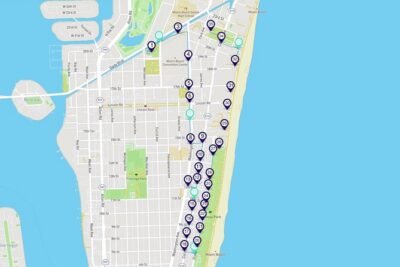

Browse the lists this tour appears in